
SDK
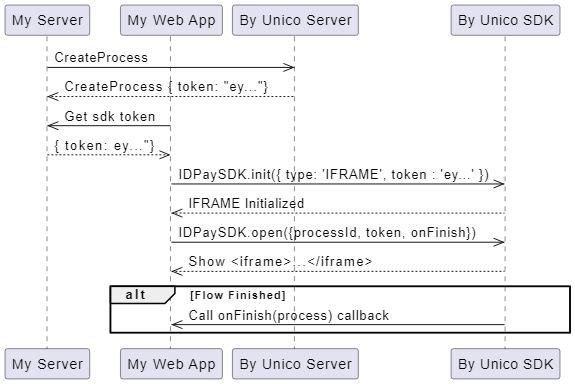
In this section, you will find how to implement the Unico SDK in your web application for using the by Unico
How to start
$ npm install idpay-b2b-sdkAvailable methods
1
2
open(options)
const processId = '9bc22bac-1e64-49a5-94d6-9e4f8ec9a1bf';
const token = 'eyJhbGciOiJIUzI1NiIsInR5cCI6IkpXVCJ9.eyJzdWIiOiIxMjM0NTY3ODkwIiwibmFtZSI6IkpvaG4gRG9lIiwiaWF0IjoxNTE2MjM5MDIyfQ.SflKxwRJSMeKKF2QT4fwpMeJf36POk6yJV_adQssw5c';

const process = {
  id: '9bc22bac-1e64-49a5-94d6-9e4f8ec9a1bf',
  concluded: true,
  captureConcluded: true
};

const onFinishCallback = process => {
  console.log('Process', process);
}

ByUnicoSDK.open({
  transactionId: processId,
  token: token,
  onFinish: onFinishCallback
});
Security
Opt for the Iframe Solution with Auth Token Instead of CSP
Context and Challenges with CSP
Vulnerability with Dynamic Domains
Solution with Iframe and Auth Token
How It Works
Last updated